Configuring two-way SSL using Estonian ID-cards in the Ubuntu Apache2 web server
Version: 26.08/1
Published by: RIA
Version information
| Date | Version | Changes/Notes |
|---|---|---|
| 06/02/2019 | 19.02/1 | Public version. |
| 20/02/2019 | 19.02/1 | Added the chapter of additional configuration options: firewall and OCSP configuration, default website removal. — Changed by: Urmas Vanem |
| 12/12/2019 | 19.12/1 | Added recommendations for securing Apache. — Changed by: Urmas Vanem |
| 16/12/2020 | 20.12/1 | Added a requirement for the user certificate to have the correct extendedKeyUsage field and the right certificate issuer. See the chapter ‘Additional filtering of user certificates’. — Changed by: Urmas Vanem |
| 17/12/2020 | 20.12/2 | Added the directive SSLCADNRequestPath, see the chapter ‘Filtering certificates displayed to the user’. — Changed by: Urmas Vanem |
| 13/01/2021 | 21.01/1 | Added the demonstrative configuration file as a link. Added HSTS configuration. — Changed by: Urmas Vanem |
| 21/01/2021 | 21.01/2 | SSLOCSPEnable directive replaced from on to leaf. Updated TLS 1.2 cipher recommendations and TLS protocol usage recommendations. Variable names in Democonf and document have been synchronised. — Changed by: Urmas Vanem |
| 27/01/2021 | 21.01/3 | Added the mobile-ID filter. — Changed by: Urmas Vanem |
| 26/02/2021 | 21.02/1 | Added the alternative possibility to filter intermediate certificate authorities using the SSLCADNRequestFile directive. — Changed by: Urmas Vanem |
| 27/04/2021 | 21.04/1 | Support for outdated ESTEID-SK 2011 certificates removed. — Changed by: Urmas Vanem |
| 25/11/2021 | 21.11/1 | Ubuntu version updated to Ubuntu Server 21.10. Apache version updated to 2.4.48. Added guidance for ECC certificates. Updated TLS and cipher recommendations. |
| 21/02/2023 | 23.02/1 | Ubuntu version updated to Ubuntu Server 22.04. Apache version updated to 2.4.55. Updates in the virtual host configuration. — Changed by: Urmas Vanem |
| 27/12/2023 | 23.12/1 | Removed the ESTEID-SK 2015 chain. — Changed by: Urmas Vanem |
| 27/12/2023 | 23.12/2 | Removed the outdated OCSP responder certificate. — Changed by: Urmas Vanem |
| 22/08/2024 | 24.08/1 | Ubuntu version updated to Ubuntu Server 24.04. Apache version updated to 2.4.62. Updates in the virtual host configuration. — Changed by: Urmas Vanem |
| 31/10/2025 | 25.10/1 | Added Zetes certificates. — Changed by: Raul Kaidro |
| 22/04/2026 | 26.04/1 | Converted to Markdown format. — Changed by: Raul Metsma |
| 21/08/2026 | 26.08/1 | Updated certificate-key, TLS protocol, cipher-suite, certificate-policy, and OCSP guidance based on the 2026 cryptographic algorithms life-cycle report. — Changed by: Raul Metsma |
- Configuring two-way SSL using Estonian ID-cards in the Ubuntu Apache2 web server
Introduction
This guide describes:
- How to install and configure the Apache2 (v. 2.4.66) web server on Ubuntu Server 24.04.
- How to configure HTTPS (one-way SSL) in the web server.
- How to configure ID-card authentication (two-way SSL) using SK ID Solutions (
EE-GovCA2018) and Zetes (EEGovCA2025) ID-cards. - Other options for server configuration and recommendations for ensuring security.
Apache2 installation and configuration
Installation
-
Renew the Ubuntu package data – in the terminal, run
$ apt update Hit:1 http://ee.archive.ubuntu.com/ubuntu noble InRelease Hit:2 http://ee.archive.ubuntu.com/ubuntu noble-updates InRelease Hit:3 http://ee.archive.ubuntu.com/ubuntu noble-backports InRelease Get:4 http://ee.archive.ubuntu.com/ubuntu noble/main Icons (48x48) [106 kB] Hit:5 http://security.ubuntu.com/ubuntu noble-security InRelease Get:6 http://ee.archive.ubuntu.com/ubuntu noble/main Icons (64x64) [156 kB] Get:7 http://ee.archive.ubuntu.com/ubuntu noble/main Icons (64x64@2) [21.8 kB] Get:8 http://ee.archive.ubuntu.com/ubuntu noble/universe Icons (48x48) [3,717 kB] -
Install Apache2 with the command
$ apt install apache2
Reading package lists... Done
Building dependency tree... Done
Reading state information... Done
The following additional packages will be installed:
  apache2-bin apache2-data apache2-utils libapr1t64 libaprutil1-dbd-sqlite3
  libaprutil1-ldap libaprutil1t64
Suggested packages:
  apache2-doc apache2-suexec-pristine | apache2-suexec-custom
As result of the previous steps, the Apache server is now installed1.
$ apache2 -v
Server version: Apache/2.4.58 (Ubuntu)
Server built:   2025-08-11T11:10:09
Update Apache to version 2.4.66 using the following commands:
add-apt-repository ppa:ondrej/apache2
apt update
apt upgrade
Apache has now been successfully updated to version 2.4.66 as expected:
$ apache2 -v
Server version: Apache/2.4.66 (Ubuntu)
Server built:   2025-07-26T17:41:22
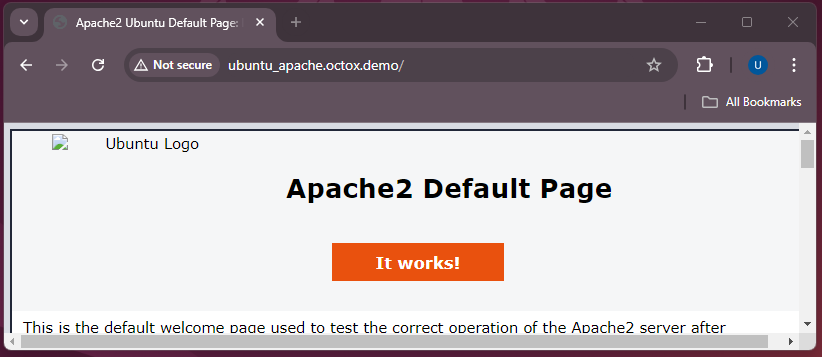
With version 2.4.66, the Apache2 web server runs in the insecure HTTP mode:
Configuration
Enabling one-way SSL
Enable SSL for Apache2 with the command a2enmod ssl and restart the Apache2 service with systemctl restart apache2
$ a2enmod ssl
Considering dependency mime for ssl:
Module mime already enabled
Considering dependency socache_shmcb for ssl:
Enabling module socache_shmcb.
Enabling module ssl.
See /usr/share/doc/apache2/README.Debian.gz on how to configure SSL and create self-signed certificates.
To activate the new configuration, you need to run:
  systemctl restart apache2
$ systemctl restart apache2
Creating the private key and the Certification Signing Request (CSR) file
Elliptic Curve Cryptography (ECC)
First, generate an ECC private key, then generate an ECC CSR2:
$ openssl ecparam -name secp384r1 -genkey -noout -out Apache2404.key
$ openssl req -new -key Apache2404.key -out Apache2404.csr -subj /C=EE/O=OctoX/CN=Apache2404.octox.demo -reqexts SAN -config <(cat /etc/ssl/openssl.cnf <(printf "[SAN]\nsubjectAltName=DNS:Apache2404.octox.demo,DNS:MYWEBSERVER.octox.demo"))
Apache2404.keyis the private key of the certificate;Apache2404.csris the CSR for the certificate authority (CA);CN=Apache2404.octox.demois the common name for the certificate;DNS:Apache2404.octox.demoandDNS:MYWEBSERVER.octox.demoare the SAN DNS names for the certificate. These names must correspond to the actual address of the website3. The names must also be resolvable in name services.
Generate a separate private key for every independent TLS server. Do not copy one key between servers merely because a wildcard or multi-SAN certificate could cover all their names. Keeping keys separate limits the impact of a server or key compromise.
For production deployments, use a hardware security module (HSM) or an equivalent non-exportable hardware-backed key store where supported. Generate the key inside the device and keep it non-exportable. Confirm that the HSM, OpenSSL integration, and certificate issuer support the selected ECDSA P-384 key before deployment. The file-based key in this example is not an HSM setup.
The contents of the CSR can be viewed by running
$ openssl req -in Apache2404.csr -noout -text
Certificate Request:
    Data:
        Version: 1 (0x0)
        Subject: C = EE, O = OctoX, CN = Apache2404.octox.demo
        Subject Public Key Info:
            Public Key Algorithm: id-ecPublicKey
                Public-Key: (384 bit)
                pub:
                    04:db:9b:fe:8c:11:87:00:b1:71:9b:54:06:3a:49:
                    71:b0:89:04:dc:a9:75:52:54:42:39:07:21:84:51:
                    b7:5b:07:61:09:5b:e7:82:ff:60:58:b3:af:5e:73:
                    ee:03:47:1d:9d:26:e6:fe:92:e0:60:df:71:23:8e:
                    24:2b:11:be:68:f6:08:6c:3e:be:dc:7d:f4:32:6e:
                    9e:ae:5e:73:5f:fd:43:74:ab:8d:7d:d8:91:b6:e1:
                    52:f9:f6:53:aa:df:64
                ASN1 OID: secp384r1
                NIST CURVE: P-384
        Attributes:
            Requested Extensions:
                X509v3 Subject Alternative Name:
                    DNS:Apache2404.octox.demo, DNS:MYWEBSERVER.octox.demo
        Signature Algorithm: ecdsa-with-SHA256
        Signature Value:
Ordering and installing an SSL certificate
The CSR Apache2404.csr should be sent to trustworthy CA. In the demo environment, the certificate issuer is the test CA. Signed certificate is issued in PEM format.
-----BEGIN CERTIFICATE-----
MIICGDCCAZGAwIBAgITEQAAAAnfuexBOWmmSg...
...
o6DunYynxvZsuwE5
-----END CERTIFICATE-----
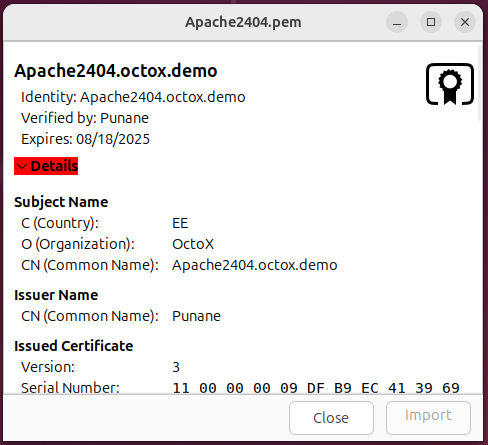
In Ubuntu, the certificate looks like the following picture:
The certificate also includes the algorithm and alternative SAN DNS names of the subject:
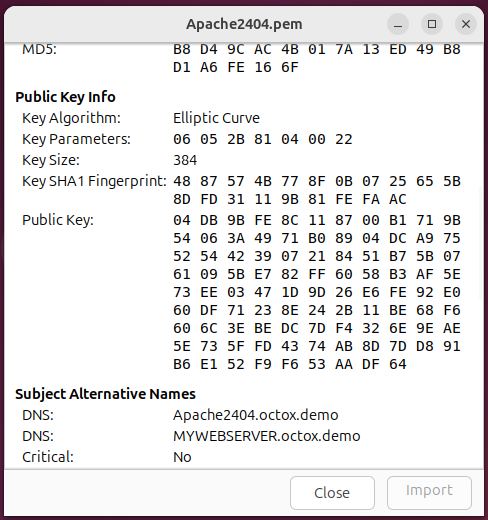
As you can see, the certificate issuer is a CA named Punane. Now, you need to create a certificate file in which both the TLS certificate of the future web server and its chain of issuers are located. To do this, add the issuer’s certificate in PEM format to the certificate file of the web server and save the file as Apache2404.pem.
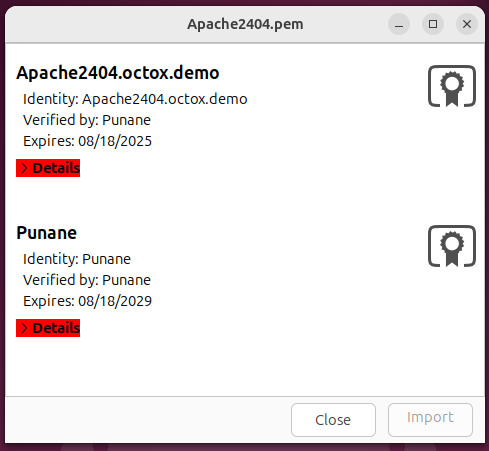
Place the generated file in the /etc/ssl/certs folder. In addition, you need to place the certificate private key in the /etc/ssl/private folder.
$ cp Apache2404.pem /etc/ssl/certs
$ cp Apache2404.key /etc/ssl/private
Now, the certificates and private key needed by Apache2 for one-way SSL have been correctly installed.
Creating a virtual website
Create a separate virtual website for your configuration. First, create a home folder named /var/www/Apache2404 for the content of the website.
$ mkdir /var/www/Apache2404
Place a simple and recognisable webpage in the folder. In this example, the file /var/www/html/index.html is copied to the new folder for testing. Minor modifications are made in the heading or title of the copied webpage to ensure it is taken from the right place.
Next, prepare the virtual site configuration file. Create a new file named /etc/apache2/sites-available/Apache2404.conf (e.g. with the command nano /etc/apache2/sites-available/Apache2404.conf)
$ nano /etc/apache2/sites-available/Apache2404.conf
Now, change the new configuration file as you wish. Paste the following configuration in it:
# <VirtualHost Apache2404.octox.demo:80>
#   By contacting the HTTP site, automatic HTTP -> HTTPS redirection takes place with the next two lines.
    ServerName Apache2404.octox.demo
    Redirect / https://Apache2404.octox.demo
# </VirtualHost>

<VirtualHost Apache2404.octox.demo:443>
    # General info
    ServerName Apache2404.octox.demo:443
    DocumentRoot /var/www/Apache2404

    # SSL configuration
    SSLEngine on
    SSLCertificateFile /etc/ssl/certs/Apache2404.pem
    SSLCertificateKeyFile /etc/ssl/private/Apache2404.key

    # Error collection configuration
    ErrorLog ${APACHE_LOG_DIR}/error.log
    CustomLog ${APACHE_LOG_DIR}/access.log combined
</VirtualHost>
Activate the new configuration with a2ensite Apache2404.conf and restart the Apache2 service.
$ a2ensite Apache2404.conf

Enabling site Apache2404.
To activate the new configuration, you need to run:
  systemctl reload apache2
$ systemctl reload apache2
Now, the new website can be accessed by one-way SSL. In addition, all HTTP requests to the site http://Apache2404.octox.demo are automatically redirected to the HTTPS site https://Apache2404.octox.demo.
Result
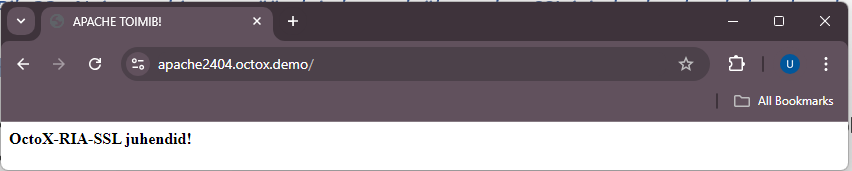
Note: There can be many similar virtual websites with different names in the same Apache2 server with a single IP address.
Requiring two-way SSL
If you wish to allow website access by authenticating with an Estonian ID-card, you need to supplement the existing configuration slightly.
Add the following lines to the SSL section of the file Apache2404.conf:
SSLVerifyClient require
SSLVerifyDepth 2
SSLCACertificateFile /etc/ssl/certs/EID_Bundle.pem
Now, create a new text file named EID_Bundle.pem, which includes the eID root and intermediate certificates (EE-GovCA2018, ESTEID2018, EEGovCA2025, ESTEID2025) in PEM format. With this file, you can filter out all CA’s whose certificates are supported by the new website. The user will only see the certificates from those chains. When opened in Ubuntu, the file looks like this:
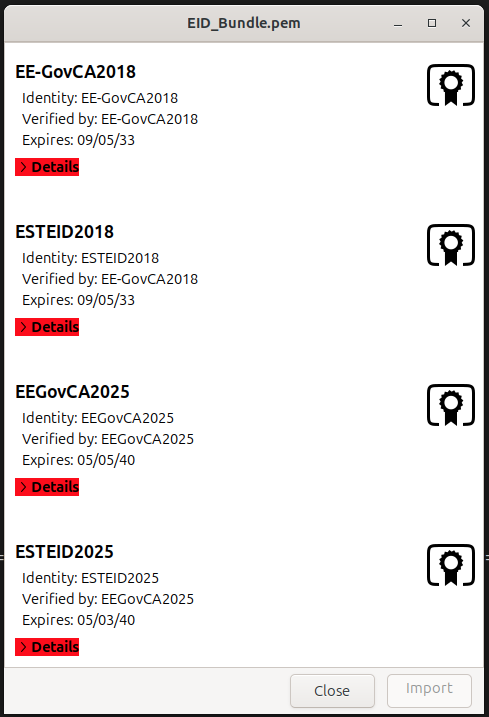
Save the file as EID_Bundle.pem and copy it to the folder /etc/ssl/certs. Restart Apache2 web server with the command systemctl reload apache2 to activate the change in the web server.
After accessing the website https://Apache2404.octox.demo now, a user certificate is required.
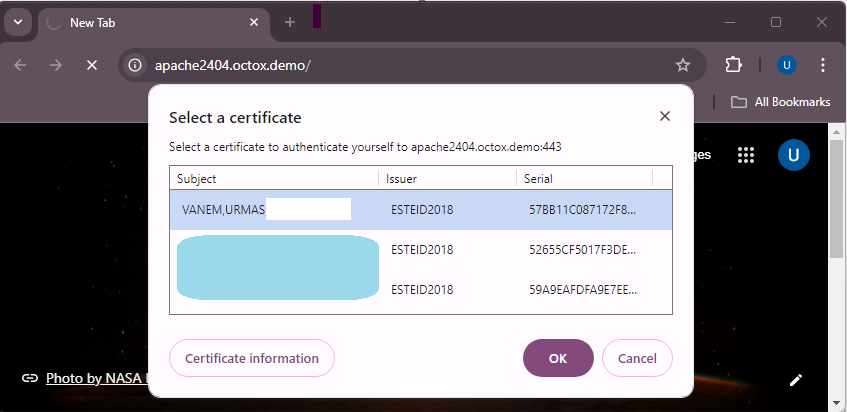
The server suggests certificates to the user, the issuers of which are described in the file EID_Bundle.pem. After confirming the certificate and entering the PIN, the user can access the website – two-way SSL works.
A complete demonstrative Apache2 configuration file combining all settings in this document is available in the Appendix.
Additional configuration options
The purpose of this document is not to give exact guidance on how to optimise or protect websites, but to show how to configure two-way SSL for Estonian ID-cards. However, you should take into account the following.
Firewall rules (if necessary)
For creating a firewall rule, run the command on the terminal:
$ ufw allow 'DESIRABLE RULE'
For example, to allow HTTPS traffic only, run
$ ufw enable
Firewall is active and enabled on system startup
$ ufw allow 443/tcp
Rule added
Rule added (v6)
If the firewall is active (ufw enable), running the command ufw status in the terminal shows the active rules.
$ ufw status
Status: active

To                         Action      From
--                         ------      ----
443/tcp                    ALLOW       Anywhere
443/tcp (v6)               ALLOW       Anywhere (v6)
Checking client-certificate revocation with OCSP4
OCSP (Online Certificate Status Protocol) lets Apache check the revocation status of a client certificate during authentication.
Certificates issued under the ESTEID2018 and ESTEID2025 CAs contain their AIA OCSP service address (http://aia.sk.ee/esteid2018 and http://ocsp.eidpki.ee).
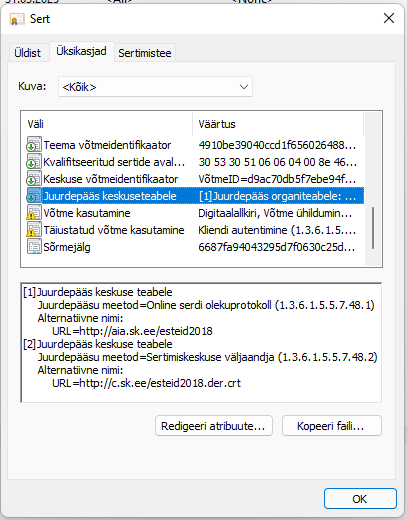
To enable the user certificate validity check against the AIA OCSP service, you need to add the following lines to the SSL configuration of Apache2:
SSLOCSPEnable leaf
SSLOCSPUseRequestNonce off
The leaf value checks the end-user certificate. The responder address is taken from that certificate. This strict configuration does not use no_ocsp_for_cert_ok: a missing responder URL or an unsuccessful OCSP check prevents client-certificate authentication. Allow outbound HTTP access to both responders and monitor Apache errors. Reload Apache with systemctl reload apache2 after applying the change.
Stapling the server-certificate OCSP response
Client-certificate validation above and server-certificate OCSP stapling are separate functions. Stapling lets Apache obtain a signed status response for its own server certificate and send it during the TLS handshake. This avoids each browser querying the issuing CA and improves client privacy.5
First check whether the server certificate contains an OCSP responder URI:
$ openssl x509 -in /etc/ssl/certs/Apache2404.pem -noout -ocsp_uri
If the command returns a supported URI, enable the shared-memory cache and production error handling in /etc/apache2/mods-available/ssl.conf:
SSLStaplingCache "shmcb:${APACHE_RUN_DIR}/ssl_stapling(32768)"
SSLStaplingReturnResponderErrors off
SSLStaplingResponderTimeout 4
SSLStaplingErrorCacheTimeout 60
Ensure socache_shmcb is enabled, then add SSLUseStapling On to the HTTPS virtual host. Do not enable stapling when the issuing CA does not provide an OCSP service.
$ a2enmod socache_shmcb
$ systemctl restart apache2
$ openssl s_client -connect Apache2404.octox.demo:443 \
    -servername Apache2404.octox.demo -status </dev/null
The output must contain a successful OCSP response and a good certificate status. Monitor refresh errors and ensure the server can reach the responder.
Default webpage removal
The default webpage is also installed with the Apache2 installation. To remove the default website from the solution, run a2dissite 000-default.conf and activate the change with systemctl reload apache2.
$ a2dissite 000-default.conf
Site 000-default disabled.
To activate the new configuration, you need to run:
  systemctl reload apache2
$ systemctl reload apache2
Recommended security settings for Apache
SSL/TLS
Do not rely on the Apache or operating-system defaults to select TLS protocol versions. Check the effective configuration with:
$ grep -i -r "SSLProtocol" /etc/apache2/mods-available/
/etc/apache2/mods-available/ssl.conf:SSLProtocol all -SSLv3
Disable TLS 1.0 and TLS 1.1. New and updated deployments should enable only TLS 1.3 by default. Add TLS 1.2 only as a documented exception when the service must support clients from 2020 or earlier, or when a client certificate must be requested after the initial TLS connection has been established. When TLS 1.2 is enabled, configure an explicit secure cipher-suite allowlist.
TLS 1.3 configuration:
SSLProtocol -all +TLSv1.3
For a documented compatibility exception, enable TLS 1.2 and TLS 1.3:
SSLProtocol -all +TLSv1.2 +TLSv1.3
The report recommends disabling renegotiation when TLS 1.2 is enabled. If a deployment depends on requesting a client certificate after the initial handshake, disabling renegotiation prevents that flow. Prefer a separate virtual host that requests the certificate during the initial handshake; do not retain renegotiation merely for a location-specific authentication flow.
When the TLS implementation and deployed clients provide production support, prioritize the hybrid X25519MLKEM768 group. This guide does not hard-code a group setting because support and the standardized identifier depend on the installed OpenSSL version. Confirm the effective group with a current TLS scanner before relying on it.
If you want to make the change at the server level, modify the parameter SSLProtocol in the file /etc/apache2/mods-available/ssl.conf.
More information about the recommendations for the use of the cipher suites can be found in the cryptographic algorithms life cycle report ordered by RIA at https://www.id.ee/en/article/cryptographic-algorithms-life-cycle-reports-2/.
Cipher suites
Configure an explicit allowlist instead of relying on OpenSSL aliases such as HIGH. For TLS 1.3, enable the following suites in this order:
SSLCipherSuite TLSv1.3 "TLS_AES_256_GCM_SHA384:TLS_CHACHA20_POLY1305_SHA256:TLS_AES_128_GCM_SHA256"
TLS_AES_128_CCM_SHA256 may be used only as a fallback when AES-GCM and ChaCha20-Poly1305 are unavailable. Do not enable CCM_8 suites.
When the documented TLS 1.2 compatibility exception applies, enable only the three ECDHE-ECDSA and AEAD suites below. This matches the ECDSA-only certificate profile used in this guide:
SSLCipherSuite SSL "ECDHE-ECDSA-AES128-GCM-SHA256:ECDHE-ECDSA-AES256-GCM-SHA384:ECDHE-ECDSA-CHACHA20-POLY1305"
The SSL protocol qualifier applies to cipher suites through TLS 1.2; the separate TLSv1.3 directive controls TLS 1.3. Because this guide disables older protocol versions, the SSL list is available only to TLS 1.2. The TLS 1.2 list excludes RSA authentication and key exchange, static DH/ECDH, CBC, CCM_8, and non-AEAD suites.
You can also configure cipher suites at the server level by modifying the parameter SSLCipherSuite in the file /etc/apache2/mods-available/ssl.conf.
Check the effective list with openssl ciphers -v and verify the negotiated protocol and suite with a current TLS scanner after every configuration change.
Compression
Keep TLS compression disabled explicitly:
SSLCompression off
HTTP response compression is separate from TLS compression and can disclose secrets when a response contains both attacker-controlled input and sensitive data. Disable mod_deflate and mod_brotli for sensitive dynamic responses. If response compression must remain enabled, the application must prevent cross-site request forgery and mitigate response-length leakage.
More information about the recommendations for the use of the cipher suites can be found in the cryptographic algorithms life cycle report ordered by RIA at https://www.id.ee/en/article/cryptographic-algorithms-life-cycle-reports-2/.
SSLHonorCipherOrder
Another important parameter related to ciphers is SSLHonorCipherOrder, the value of which should be set to ON in the configuration file. This way, the server’s list of cipher suites is always preferred over the user’s. By default, this parameter is undefined and its default value is off.
Additional filtering of user certificates
Trusting a CA chain does not prove that the leaf certificate is an ID-card authentication certificate. Different certificate products can share a root or intermediate CA. Before accepting the authenticated identity, require all of the following:
- Apache successfully validates the complete certificate chain;
- the issuer is an explicitly allowed intermediate CA;
extendedKeyUsagepermits TLS web-client authentication;- the leaf certificate’s
X509v3 CertificatePoliciesextension (2.5.29.32) contains both the NCP+ authentication-policy OID and an allowed document-policy OID for the certificate’s CA generation.6
For production certificates covered by this guide, use this allowlist:
# Required in every accepted authentication certificate
0.4.0.2042.1.2

# ESTEID2018 - require one of these document-policy OIDs
1.3.6.1.4.1.51361.1.1.1
1.3.6.1.4.1.51361.1.1.2
1.3.6.1.4.1.51361.1.1.3
1.3.6.1.4.1.51361.1.1.4
1.3.6.1.4.1.51361.1.1.5
1.3.6.1.4.1.51361.1.1.6
1.3.6.1.4.1.51361.1.1.7
1.3.6.1.4.1.51455.1.1.1

# ESTEID2025 - require one of these document-policy OIDs
1.3.6.1.4.1.51361.2.1.1
1.3.6.1.4.1.51361.2.1.2
1.3.6.1.4.1.51361.2.1.3
1.3.6.1.4.1.51361.2.1.4
1.3.6.1.4.1.51361.2.1.5
1.3.6.1.4.1.51361.2.1.6
1.3.6.1.4.1.51455.2.1.1
Correlate the document-policy OID with the validated issuer: an ESTEID2018 certificate must not be accepted using an ESTEID2025 policy OID, or vice versa. The common NCP+ OID is not product-specific and is insufficient on its own. Do not add test OIDs, such as Zetes OIDs prefixed with 2.999, to a production allowlist.
The issuer and EKU checks below are useful defence in depth, but they do not replace the certificate-policy check:
<Location "/">
Require expr (
  (
    %{SSL_CLIENT_I_DN_CN} == "ESTEID2018"
    || %{SSL_CLIENT_I_DN_CN} == "ESTEID2025"
  )
  and (
    "TLS Web Client Authentication, E-mail Protection"
    in PeerExtList('extendedKeyUsage')
  )
)
</Location>
The configuration can be added to the virtual host or Apache’s main configuration. The application or an authentication gateway must then parse the verified leaf certificate and reject authentication unless both the NCP+ OID and a matching document-policy OID are present. Do not infer the certificate product from its subject, issuer, or EKU alone, and do not treat the anyPolicy OID (2.5.29.32.0) as proof of an ID-card policy.
When the application is integrated through CGI or another interface that uses Apache environment variables, SSLOptions +ExportCertData makes the PEM-encoded leaf certificate available as SSL_CLIENT_CERT. Other application interfaces should use their native TLS client-certificate API. Only accept certificate data supplied through the trusted Apache-to- application connection; never trust a client-provided certificate header.
To inspect the extension while testing an exported certificate:
$ openssl x509 -in client.pem -noout -text
Check the X509v3 Certificate Policies section against the current policy and certificate-profile sources cited above. Test at least one accepted ID-card certificate and certificates for other products issued in related hierarchies, including Mobile-ID where applicable.
Note: If you are using another feature to filter network traffic, the secure configuration should be implemented there, too. SK has published information about the F5 configuration in the chapter ‘Only accept certificates with trusted key usage’ in the following article: https://github.com/SK-EID/smart-id-documentation/wiki/Secure-Implementation-Guide
Note: SK’s recommendations for secure ID-card authentication are published here in the chapter ‘Defence: implement ID-card authentication securely’: https://github.com/SK-EID/smart-id-documentation/wiki/Secure-Implementation-Guide
Filtering certificates displayed to the user
By default, the selection of certificates displayed to the user is not limited, which means that all user authentication certificates are listed during authentication in the web server. However, you should only display the certificates issued from the ESTEID2018 or ESTEID2025 chain to the user. To do so:
- Create a file for accepted chains
/etc/ssl/certs/DN_Bundle.pem - Put the
ESTEID2018andESTEID2025certificates in PEM format into the created file - add the directive
SSLCADNRequestFile /etc/ssl/certs/DN_Bundle.peminto the SSL section of the Apache configuration file and save the new configuration; - restart the Apache server with
systemctl reload apache2
Now, Apache will send information to the user that only certificates issued from the ESTEID2018 or ESTEID2025 chains are supported and only certificates issued from those chains are displayed to the user.
Enabling HTTP Strict Transport Security (HSTS)
-
Enable mod-headers in the terminal with
a2enmod headers$ a2enmod headers Enabling module headers. To activate the new configuration, you need to run: systemctl restart apache2 -
Add the following line to the Apache configuration:
# Enable HSTS. Header always set Strict-Transport-Security "max-age=31536000; includeSubDomains" -
Restart the Apache service to apply both changes:
$ systemctl restart apache2
Additional possibilities
In addition to TLS and cipher suite configuration, you should pay attention to the security of the Apache server from the following aspects:
- Keep the operating system up to date.
- Keep Apache up to date.
- Run Apache under non-root user rights.
- Disable presenting server information.
- Remove unnecessary modules.
- Add and configure Mod Security.
- Add and configure Mod Evasive.
- Disable default directory listing.
- Enable logging.
- …
The above is a sample list of ways to improve Apache security. Detailed recommendations are available online: https://www.google.com/search?q=how+to+secure+apache+server.
Appendix
EID_Bundle.pem
# EE-GovCA2018
-----BEGIN CERTIFICATE-----
MIIE+DCCBFmgAwIBAgIQMLOwlXoR0oFbj52nmRsnezAKBggqhkjOPQQDBDBaMQsw
CQYDVQQGEwJFRTEbMBkGA1UECgwSU0sgSUQgU29sdXRpb25zIEFTMRcwFQYDVQRh
DA5OVFJFRS0xMDc0NzAxMzEVMBMGA1UEAwwMRUUtR292Q0EyMDE4MB4XDTE4MDkw
NTA5MTEwM1oXDTMzMDkwNTA5MTEwM1owWjELMAkGA1UEBhMCRUUxGzAZBgNVBAoM
ElNLIElEIFNvbHV0aW9ucyBBUzEXMBUGA1UEYQwOTlRSRUUtMTA3NDcwMTMxFTAT
BgNVBAMMDEVFLUdvdkNBMjAxODCBmzAQBgcqhkjOPQIBBgUrgQQAIwOBhgAEAMcb
/dmAcVo/b2azEPS6CfW7fEA2KuHKC53D7ShVNvLz4QUjCdTXjds/4u99jUoYEQec
luVVzMlgEJR1nkN2eOrLAZYxPjwG5HiI1iZEyW9QKVdeEgyvhzWWTNHGjV3HdZRv
7L9o4533PtJAyqJq9OTs6mjsqwFXjH49bfZ6CGmzUJsHo4ICvDCCArgwEgYDVR0T
AQH/BAgwBgEB/wIBATAOBgNVHQ8BAf8EBAMCAQYwNAYDVR0lAQH/BCowKAYIKwYB
BQUHAwkGCCsGAQUFBwMCBggrBgEFBQcDBAYIKwYBBQUHAwEwHQYDVR0OBBYEFH4p
Vuc0knhOd+FvLjMqmHHB/TSfMB8GA1UdIwQYMBaAFH4pVuc0knhOd+FvLjMqmHHB
/TSfMIICAAYDVR0gBIIB9zCCAfMwCAYGBACPegECMAkGBwQAi+xAAQIwMgYLKwYB
BAGDkSEBAQEwIzAhBggrBgEFBQcCARYVaHR0cHM6Ly93d3cuc2suZWUvQ1BTMA0G
CysGAQQBg5EhAQECMA0GCysGAQQBg5F/AQEBMA0GCysGAQQBg5EhAQEFMA0GCysG
AQQBg5EhAQEGMA0GCysGAQQBg5EhAQEHMA0GCysGAQQBg5EhAQEDMA0GCysGAQQB
g5EhAQEEMA0GCysGAQQBg5EhAQEIMA0GCysGAQQBg5EhAQEJMA0GCysGAQQBg5Eh
AQEKMA0GCysGAQQBg5EhAQELMA0GCysGAQQBg5EhAQEMMA0GCysGAQQBg5EhAQEN
MA0GCysGAQQBg5EhAQEOMA0GCysGAQQBg5EhAQEPMA0GCysGAQQBg5EhAQEQMA0G
CysGAQQBg5EhAQERMA0GCysGAQQBg5EhAQESMA0GCysGAQQBg5EhAQETMA0GCysG
AQQBg5EhAQEUMA0GCysGAQQBg5F/AQECMA0GCysGAQQBg5F/AQEDMA0GCysGAQQB
g5F/AQEEMA0GCysGAQQBg5F/AQEFMA0GCysGAQQBg5F/AQEGMDEGCisGAQQBg5Eh
CgEwIzAhBggrBgEFBQcCARYVaHR0cHM6Ly93d3cuc2suZWUvQ1BTMBgGCCsGAQUF
BwEDBAwwCjAIBgYEAI5GAQEwCgYIKoZIzj0EAwQDgYwAMIGIAkIBk698EqetY9Tt
6HwO50CfzdIIjKmlfCI34xKdU7J+wz1tNVu2tHJwEhdsH0e92i969sRDp1RNPlVh
4XFJzI3oQFQCQgGVxmcuVnsy7NUscDZ0erwovmbFOsNxELCANxNSWx5xMqzEIhV8
46opxu10UFDIBBPzkbBenL4h+g/WU7lG78fIhA==
-----END CERTIFICATE-----
# ESTEID2018
-----BEGIN CERTIFICATE-----
MIIFVzCCBLigAwIBAgIQdUf6rBR0S4tbo2bU/mZV7TAKBggqhkjOPQQDBDBaMQsw
CQYDVQQGEwJFRTEbMBkGA1UECgwSU0sgSUQgU29sdXRpb25zIEFTMRcwFQYDVQRh
DA5OVFJFRS0xMDc0NzAxMzEVMBMGA1UEAwwMRUUtR292Q0EyMDE4MB4XDTE4MDky
MDA5MjIyOFoXDTMzMDkwNTA5MTEwM1owWDELMAkGA1UEBhMCRUUxGzAZBgNVBAoM
ElNLIElEIFNvbHV0aW9ucyBBUzEXMBUGA1UEYQwOTlRSRUUtMTA3NDcwMTMxEzAR
BgNVBAMMCkVTVEVJRDIwMTgwgZswEAYHKoZIzj0CAQYFK4EEACMDgYYABAHHOBlv
7UrRPYP1yHhOb7RA/YBDbtgynSVMqYdxnFrKHUXh6tFkghvHuA1k2DSom1hE5kqh
B5VspDembwWDJBOQWQGOI/0t3EtccLYjeM7F9xOPdzUbZaIbpNRHpQgVBpFX0xpL
TgW27MpIMhU8DHBWFpeAaNX3eUpD4gC5cvhsK0RFEqOCAx0wggMZMB8GA1UdIwQY
MBaAFH4pVuc0knhOd+FvLjMqmHHB/TSfMB0GA1UdDgQWBBTZrHDbX36+lPig5L5H
otA0rZoqEjAOBgNVHQ8BAf8EBAMCAQYwEgYDVR0TAQH/BAgwBgEB/wIBADCCAc0G
A1UdIASCAcQwggHAMAgGBgQAj3oBAjAJBgcEAIvsQAECMDIGCysGAQQBg5EhAQEB
MCMwIQYIKwYBBQUHAgEWFWh0dHBzOi8vd3d3LnNrLmVlL0NQUzANBgsrBgEEAYOR
IQEBAjANBgsrBgEEAYORfwEBATANBgsrBgEEAYORIQEBBTANBgsrBgEEAYORIQEB
BjANBgsrBgEEAYORIQEBBzANBgsrBgEEAYORIQEBAzANBgsrBgEEAYORIQEBBDAN
BgsrBgEEAYORIQEBCDANBgsrBgEEAYORIQEBCTANBgsrBgEEAYORIQEBCjANBgsr
BgEEAYORIQEBCzANBgsrBgEEAYORIQEBDDANBgsrBgEEAYORIQEBDTANBgsrBgEE
AYORIQEBDjANBgsrBgEEAYORIQEBDzANBgsrBgEEAYORIQEBEDANBgsrBgEEAYOR
IQEBETANBgsrBgEEAYORIQEBEjANBgsrBgEEAYORIQEBEzANBgsrBgEEAYORIQEB
FDANBgsrBgEEAYORfwEBAjANBgsrBgEEAYORfwEBAzANBgsrBgEEAYORfwEBBDAN
BgsrBgEEAYORfwEBBTANBgsrBgEEAYORfwEBBjAqBgNVHSUBAf8EIDAeBggrBgEF
BQcDCQYIKwYBBQUHAwIGCCsGAQUFBwMEMGoGCCsGAQUFBwEBBF4wXDApBggrBgEF
BQcwAYYdaHR0cDovL2FpYS5zay5lZS9lZS1nb3ZjYTIwMTgwLwYIKwYBBQUHMAKG
I2h0dHA6Ly9jLnNrLmVlL0VFLUdvdkNBMjAxOC5kZXIuY3J0MBgGCCsGAQUFBwED
BAwwCjAIBgYEAI5GAQEwMAYDVR0fBCkwJzAloCOgIYYfaHR0cDovL2Muc2suZWUv
RUUtR292Q0EyMDE4LmNybDAKBggqhkjOPQQDBAOBjAAwgYgCQgDeuUY4HczUbFKS
002HZ88gclgYdztHqglENyTMtXE6dMBRnCbgUmhBCAA0mJSHbyFJ8W9ikLiSyurm
kJM0hDE9KgJCASOqA405Ia5nKjTJPNsHQlMi7KZsIcTHOoBccx+54N8ZX1MgBozJ
mT59rZY/2/OeE163BAwD0UdUQAnMPP6+W3Vd
-----END CERTIFICATE-----
# EEGovCA2025
-----BEGIN CERTIFICATE-----
MIICljCCAhygAwIBAgIUKbkXJo8FWjthNs7Hgduq1RiXqwswCgYIKoZIzj0EAwMw
WDEUMBIGA1UEAwwLRUVHb3ZDQTIwMjUxFzAVBgNVBGEMDk5UUkVFLTE3MDY2MDQ5
MRowGAYDVQQKDBFaZXRlcyBFc3RvbmlhIE/DnDELMAkGA1UEBhMCRUUwHhcNMjUw
NTA2MDgxODEzWhcNNDAwNTA1MDgxODEyWjBYMRQwEgYDVQQDDAtFRUdvdkNBMjAy
NTEXMBUGA1UEYQwOTlRSRUUtMTcwNjYwNDkxGjAYBgNVBAoMEVpldGVzIEVzdG9u
aWEgT8OcMQswCQYDVQQGEwJFRTB2MBAGByqGSM49AgEGBSuBBAAiA2IABH0zMU4D
UN/Ay6gUdWzMUDAYFaau0flpuuicO2bfK7kHNGw+psRRn6DaF/4cVQd8qHxbDF2x
N4jJf1bSpQHLsc2RZHSCI8qb4E9GmB5MDoVVxiXnBHOOW3+55Qm/BfwcwaOBpjCB
ozASBgNVHRMBAf8ECDAGAQH/AgEBMB8GA1UdIwQYMBaAFKqAqJsPu0umfsUC9HLN
LPGlKdm3MD0GA1UdIAQ2MDQwMgYEVR0gADAqMCgGCCsGAQUFBwIBFhxodHRwczov
L3JlcG9zaXRvcnkuZWlkcGtpLmVlMB0GA1UdDgQWBBSqgKibD7tLpn7FAvRyzSzx
pSnZtzAOBgNVHQ8BAf8EBAMCAQYwCgYIKoZIzj0EAwMDaAAwZQIwOy8+eV+yYNXt
XcEEdOuQd60O7lXucK3W4cDewxEoEXb4iTYFswWUZq3DacfmeE+/AjEAkzHeNdru
QqKfvqTFB3eNRnMycNcnJ3rmGe37u9zgH8wnQUuMhUClOGxeRcK4NV9I
-----END CERTIFICATE-----
# ESTEID2025
-----BEGIN CERTIFICATE-----
MIIDDzCCApagAwIBAgIUUFQrcGtK7/jCP+GyAOTPvbglGlcwCgYIKoZIzj0EAwMw
WDEUMBIGA1UEAwwLRUVHb3ZDQTIwMjUxFzAVBgNVBGEMDk5UUkVFLTE3MDY2MDQ5
MRowGAYDVQQKDBFaZXRlcyBFc3RvbmlhIE/DnDELMAkGA1UEBhMCRUUwHhcNMjUw
NTA3MTMyMDA3WhcNNDAwNTAzMTMyMDA2WjBXMRMwEQYDVQQDDApFU1RFSUQyMDI1
MRcwFQYDVQRhDA5OVFJFRS0xNzA2NjA0OTEaMBgGA1UECgwRWmV0ZXMgRXN0b25p
YSBPw5wxCzAJBgNVBAYTAkVFMHYwEAYHKoZIzj0CAQYFK4EEACIDYgAEdSEmb1An
xN7G22CCEQ3ts2YZNieTUZP4Vc4iObhmL/um4EXkiA4HgyCiR5T6olKAEkPdxFBs
fmcLoPN+TmBO8ZpLGEqy1Vwf59ahDW7dQiLXTIAEiGCoXSWI9MvtHDZ2o4IBIDCC
ARwwEgYDVR0TAQH/BAgwBgEB/wIBADAfBgNVHSMEGDAWgBSqgKibD7tLpn7FAvRy
zSzxpSnZtzBABggrBgEFBQcBAQQ0MDIwMAYIKwYBBQUHMAKGJGh0dHA6Ly9jcnQu
ZWlkcGtpLmVlL0VFR292Q0EyMDI1LmNydDA9BgNVHSAENjA0MDIGBFUdIAAwKjAo
BggrBgEFBQcCARYcaHR0cHM6Ly9yZXBvc2l0b3J5LmVpZHBraS5lZTA1BgNVHR8E
LjAsMCqgKKAmhiRodHRwOi8vY3JsLmVpZHBraS5lZS9FRUdvdkNBMjAyNS5jcmww
HQYDVR0OBBYEFJLAOLC4NhJo9crtZu5HKohtpo3oMA4GA1UdDwEB/wQEAwIBBjAK
BggqhkjOPQQDAwNnADBkAjANipgLQqdM985dSFZfKvU9A7Sz2YdmmUSZBxu0lL7Q
XKzqa0ZDyXmf03NPLNAC6dICMBQiROZbLoPezO9LDl847UbENx85hloLlzweWjqP
rY++Xj8FjCD1C9hnblsVgj3XAA==
-----END CERTIFICATE-----
DN_Bundle.pem
# ESTEID2018
-----BEGIN CERTIFICATE-----
MIIFVzCCBLigAwIBAgIQdUf6rBR0S4tbo2bU/mZV7TAKBggqhkjOPQQDBDBaMQsw
CQYDVQQGEwJFRTEbMBkGA1UECgwSU0sgSUQgU29sdXRpb25zIEFTMRcwFQYDVQRh
DA5OVFJFRS0xMDc0NzAxMzEVMBMGA1UEAwwMRUUtR292Q0EyMDE4MB4XDTE4MDky
MDA5MjIyOFoXDTMzMDkwNTA5MTEwM1owWDELMAkGA1UEBhMCRUUxGzAZBgNVBAoM
ElNLIElEIFNvbHV0aW9ucyBBUzEXMBUGA1UEYQwOTlRSRUUtMTA3NDcwMTMxEzAR
BgNVBAMMCkVTVEVJRDIwMTgwgZswEAYHKoZIzj0CAQYFK4EEACMDgYYABAHHOBlv
7UrRPYP1yHhOb7RA/YBDbtgynSVMqYdxnFrKHUXh6tFkghvHuA1k2DSom1hE5kqh
B5VspDembwWDJBOQWQGOI/0t3EtccLYjeM7F9xOPdzUbZaIbpNRHpQgVBpFX0xpL
TgW27MpIMhU8DHBWFpeAaNX3eUpD4gC5cvhsK0RFEqOCAx0wggMZMB8GA1UdIwQY
MBaAFH4pVuc0knhOd+FvLjMqmHHB/TSfMB0GA1UdDgQWBBTZrHDbX36+lPig5L5H
otA0rZoqEjAOBgNVHQ8BAf8EBAMCAQYwEgYDVR0TAQH/BAgwBgEB/wIBADCCAc0G
A1UdIASCAcQwggHAMAgGBgQAj3oBAjAJBgcEAIvsQAECMDIGCysGAQQBg5EhAQEB
MCMwIQYIKwYBBQUHAgEWFWh0dHBzOi8vd3d3LnNrLmVlL0NQUzANBgsrBgEEAYOR
IQEBAjANBgsrBgEEAYORfwEBATANBgsrBgEEAYORIQEBBTANBgsrBgEEAYORIQEB
BjANBgsrBgEEAYORIQEBBzANBgsrBgEEAYORIQEBAzANBgsrBgEEAYORIQEBBDAN
BgsrBgEEAYORIQEBCDANBgsrBgEEAYORIQEBCTANBgsrBgEEAYORIQEBCjANBgsr
BgEEAYORIQEBCzANBgsrBgEEAYORIQEBDDANBgsrBgEEAYORIQEBDTANBgsrBgEE
AYORIQEBDjANBgsrBgEEAYORIQEBDzANBgsrBgEEAYORIQEBEDANBgsrBgEEAYOR
IQEBETANBgsrBgEEAYORIQEBEjANBgsrBgEEAYORIQEBEzANBgsrBgEEAYORIQEB
FDANBgsrBgEEAYORfwEBAjANBgsrBgEEAYORfwEBAzANBgsrBgEEAYORfwEBBDAN
BgsrBgEEAYORfwEBBTANBgsrBgEEAYORfwEBBjAqBgNVHSUBAf8EIDAeBggrBgEF
BQcDCQYIKwYBBQUHAwIGCCsGAQUFBwMEMGoGCCsGAQUFBwEBBF4wXDApBggrBgEF
BQcwAYYdaHR0cDovL2FpYS5zay5lZS9lZS1nb3ZjYTIwMTgwLwYIKwYBBQUHMAKG
I2h0dHA6Ly9jLnNrLmVlL0VFLUdvdkNBMjAxOC5kZXIuY3J0MBgGCCsGAQUFBwED
BAwwCjAIBgYEAI5GAQEwMAYDVR0fBCkwJzAloCOgIYYfaHR0cDovL2Muc2suZWUv
RUUtR292Q0EyMDE4LmNybDAKBggqhkjOPQQDBAOBjAAwgYgCQgDeuUY4HczUbFKS
002HZ88gclgYdztHqglENyTMtXE6dMBRnCbgUmhBCAA0mJSHbyFJ8W9ikLiSyurm
kJM0hDE9KgJCASOqA405Ia5nKjTJPNsHQlMi7KZsIcTHOoBccx+54N8ZX1MgBozJ
mT59rZY/2/OeE163BAwD0UdUQAnMPP6+W3Vd
-----END CERTIFICATE-----
# ESTEID2025
-----BEGIN CERTIFICATE-----
MIIDDzCCApagAwIBAgIUUFQrcGtK7/jCP+GyAOTPvbglGlcwCgYIKoZIzj0EAwMw
WDEUMBIGA1UEAwwLRUVHb3ZDQTIwMjUxFzAVBgNVBGEMDk5UUkVFLTE3MDY2MDQ5
MRowGAYDVQQKDBFaZXRlcyBFc3RvbmlhIE/DnDELMAkGA1UEBhMCRUUwHhcNMjUw
NTA3MTMyMDA3WhcNNDAwNTAzMTMyMDA2WjBXMRMwEQYDVQQDDApFU1RFSUQyMDI1
MRcwFQYDVQRhDA5OVFJFRS0xNzA2NjA0OTEaMBgGA1UECgwRWmV0ZXMgRXN0b25p
YSBPw5wxCzAJBgNVBAYTAkVFMHYwEAYHKoZIzj0CAQYFK4EEACIDYgAEdSEmb1An
xN7G22CCEQ3ts2YZNieTUZP4Vc4iObhmL/um4EXkiA4HgyCiR5T6olKAEkPdxFBs
fmcLoPN+TmBO8ZpLGEqy1Vwf59ahDW7dQiLXTIAEiGCoXSWI9MvtHDZ2o4IBIDCC
ARwwEgYDVR0TAQH/BAgwBgEB/wIBADAfBgNVHSMEGDAWgBSqgKibD7tLpn7FAvRy
zSzxpSnZtzBABggrBgEFBQcBAQQ0MDIwMAYIKwYBBQUHMAKGJGh0dHA6Ly9jcnQu
ZWlkcGtpLmVlL0VFR292Q0EyMDI1LmNydDA9BgNVHSAENjA0MDIGBFUdIAAwKjAo
BggrBgEFBQcCARYcaHR0cHM6Ly9yZXBvc2l0b3J5LmVpZHBraS5lZTA1BgNVHR8E
LjAsMCqgKKAmhiRodHRwOi8vY3JsLmVpZHBraS5lZS9FRUdvdkNBMjAyNS5jcmww
HQYDVR0OBBYEFJLAOLC4NhJo9crtZu5HKohtpo3oMA4GA1UdDwEB/wQEAwIBBjAK
BggqhkjOPQQDAwNnADBkAjANipgLQqdM985dSFZfKvU9A7Sz2YdmmUSZBxu0lL7Q
XKzqa0ZDyXmf03NPLNAC6dICMBQiROZbLoPezO9LDl847UbENx85hloLlzweWjqP
rY++Xj8FjCD1C9hnblsVgj3XAA==
-----END CERTIFICATE-----
Apache2404_EID_Demo.conf
The full demonstrative configuration file is available at https://installer.id.ee/media/id2019/Apache_2.4.63_EID_Demo.conf.
<VirtualHost Apache2404.octox.demo:80>
    ServerName Apache2404.octox.demo
    Redirect / https://Apache2404.octox.demo
</VirtualHost>

<VirtualHost Apache2404.octox.demo:443>
    # General info
    ServerName Apache2404.octox.demo:443
    DocumentRoot /var/www/Apache2404

    # SSL configuration
    SSLEngine on
    SSLCertificateFile /etc/ssl/certs/Apache2404.pem
    SSLCertificateKeyFile /etc/ssl/private/Apache2404.key

    # Client certificate authentication
    SSLVerifyClient require
    SSLVerifyDepth 2
    SSLCACertificateFile /etc/ssl/certs/EID_Bundle.pem

    # AIA-OCSP
    SSLOCSPEnable leaf
    SSLOCSPUseRequestNonce off

    # Server-certificate OCSP stapling - enable only if its CA supports OCSP
    # SSLUseStapling On

    # TLS configuration — use only TLS 1.3
    SSLProtocol -all +TLSv1.3
    SSLCipherSuite TLSv1.3 "TLS_AES_256_GCM_SHA384:TLS_CHACHA20_POLY1305_SHA256:TLS_AES_128_GCM_SHA256"
    # Documented TLS 1.2 compatibility exception:
    # SSLProtocol -all +TLSv1.2 +TLSv1.3
    # SSLCipherSuite SSL "ECDHE-ECDSA-AES128-GCM-SHA256:ECDHE-ECDSA-AES256-GCM-SHA384:ECDHE-ECDSA-CHACHA20-POLY1305"
    SSLHonorCipherOrder ON
    SSLCompression off

    # Filtering certificates displayed to the user
    SSLCADNRequestFile /etc/ssl/certs/DN_Bundle.pem

    # Partial filtering of user certificates; the application must also
    # allowlist ID-card CertificatePolicies OIDs
    <Location "/">
    Require expr (
      (
        %{SSL_CLIENT_I_DN_CN} == "ESTEID2018"
        || %{SSL_CLIENT_I_DN_CN} == "ESTEID2025"
      )
      and (
        "TLS Web Client Authentication, E-mail Protection"
        in PeerExtList('extendedKeyUsage')
      )
    )
    </Location>

    # HSTS
    Header always set Strict-Transport-Security "max-age=31536000; includeSubDomains"

    # Logging
    ErrorLog ${APACHE_LOG_DIR}/error.log
    CustomLog ${APACHE_LOG_DIR}/access.log combined
</VirtualHost>
-
Currently (as at 22/04/2026), Apache version 2.4.58 is included with Ubuntu by default. The latest version of Apache is 2.4.66. ↩
-
In addition to the certificate attributes C, O, and CN described on the command line, it is also possible to describe the attributes L, OU, and S if desired. However, only CN can also be used. ↩
-
Modern browsers trust the certificate only when the requested hostname matches at least one of its SAN DNS names. ↩
-
The certificate check is also doable with certificate revocation lists (CRL), but this is not covered in this document, as the OCSP-based solution is preferred. ↩
-
https://httpd.apache.org/docs/2.4/ssl/ssl_howto.html#ocspstapling ↩
-
The allowlist is based on the ESTEID2018 certificate policy v4.0 and the ESTEID2025 certificate policy v2.0, supplemented by the Zetes certificate profiles. Check the Zetes repository and the service providers’ current policies and profiles before changing the production allowlist. ↩